How To Redesign A Website Without Losing Google Rankings
Protect valuable search visibility during a redesign with a practical URL inventory, redirect map, launch gate and post-release monitoring plan.
 Ben DunleaFounder, Hatch
You cannot guarantee that Google rankings will remain perfectly unchanged during a redesign. You can reduce avoidable risk by preserving useful content and URLs, mapping every changed address to its closest relevant destination, testing direct permanent redirects, updating technical signals and monitoring the complete customer journey after launch.
Before design: preserve what already works
Export a URL inventory from the XML sitemap, CMS, analytics, Search Console, backlink data and server logs where available. Include images, PDFs and campaign landing pages—not just navigation links.
For every URL record:
- current status and canonical;
- organic clicks/impressions and important queries;
- traffic, conversions and campaign use;
- internal and meaningful external links;
- page purpose and search intent;
- content decision: keep, improve, merge or remove;
- proposed new URL and redirect; and
- owner and test result.
Do not delete a page because it looks old. Decide whether its information, traffic, links or customer role should be retained in an improved destination.
Record a comparable baseline
Save at least the recent and year-on-year period appropriate to seasonality:
- organic clicks, impressions and landing pages;
- rankings/query groups used diagnostically;
- qualified form, call, booking and ecommerce outcomes;
- conversion rates and lead quality;
- indexed-page and sitemap status;
- Core Web Vitals/field performance; and
- important crawl errors.
Annotate the launch date in analytics. Verify forms, phone links, consent, CRM handoff and Search Console access before migration so “no data” is not mistaken for “no problem”.
Keep URLs unless there is a reason to change them
A new design system or CMS does not require new paths. Keeping an established, accurate URL removes a redirect and reduces migration complexity.
Change a URL when it is misleading, technically unsustainable, part of a necessary domain/architecture change or being consolidated into a stronger destination. Avoid cosmetic rewrites performed only to insert a keyword.
Google’s current site-move guidance recommends mapping old URLs to new destinations before release and warns that temporary ranking fluctuation can occur while pages are recrawled and reindexed.
Map each changed URL to the closest useful destination
Use one-to-one mappings where the page has a clear successor. Several old pages may legitimately consolidate into one comprehensive page when that destination covers their useful intent. A removed page with no replacement should return a real 404 or 410 rather than redirecting every old path to the homepage.
Minimum redirect map:
| Old URL | Decision | New URL | Redirect | Internal links | Pre/post test |
|---|---|---|---|---|---|
/old-service/ | Improve/move | /services/new-service/ | 301 direct | Update | Pending/pass |
/old-a/ | Consolidate | /guide/ | 301 direct | Update | Pending/pass |
/expired-item/ | Remove, no equivalent | — | 410 | Remove | Pending/pass |
Google recommends server-side permanent redirects such as 301 or 308 for permanent moves. Point directly to the final destination and avoid chains. A redirect preserves a route for users and signals a move; it does not compensate for replacing a valuable page with irrelevant content.
Preserve content, metadata and internal context
Compare the current and proposed pages side by side. Retain useful answers, evidence, media, titles/headings and intent unless research supports a change. Redesigns often lose visibility because concise new marketing copy removes the detail that made a page useful.
Update internal links to the final URLs rather than relying on redirects. Preserve contextual links that establish relationships between services, locations, guides and proof. Update navigation, breadcrumbs, hreflang where applicable, image/PDF references and campaign destinations.
Each indexable new page should normally declare its intended self-referencing canonical. Ensure canonical, redirect, sitemap and internal-link signals agree.
Use a strict launch gate
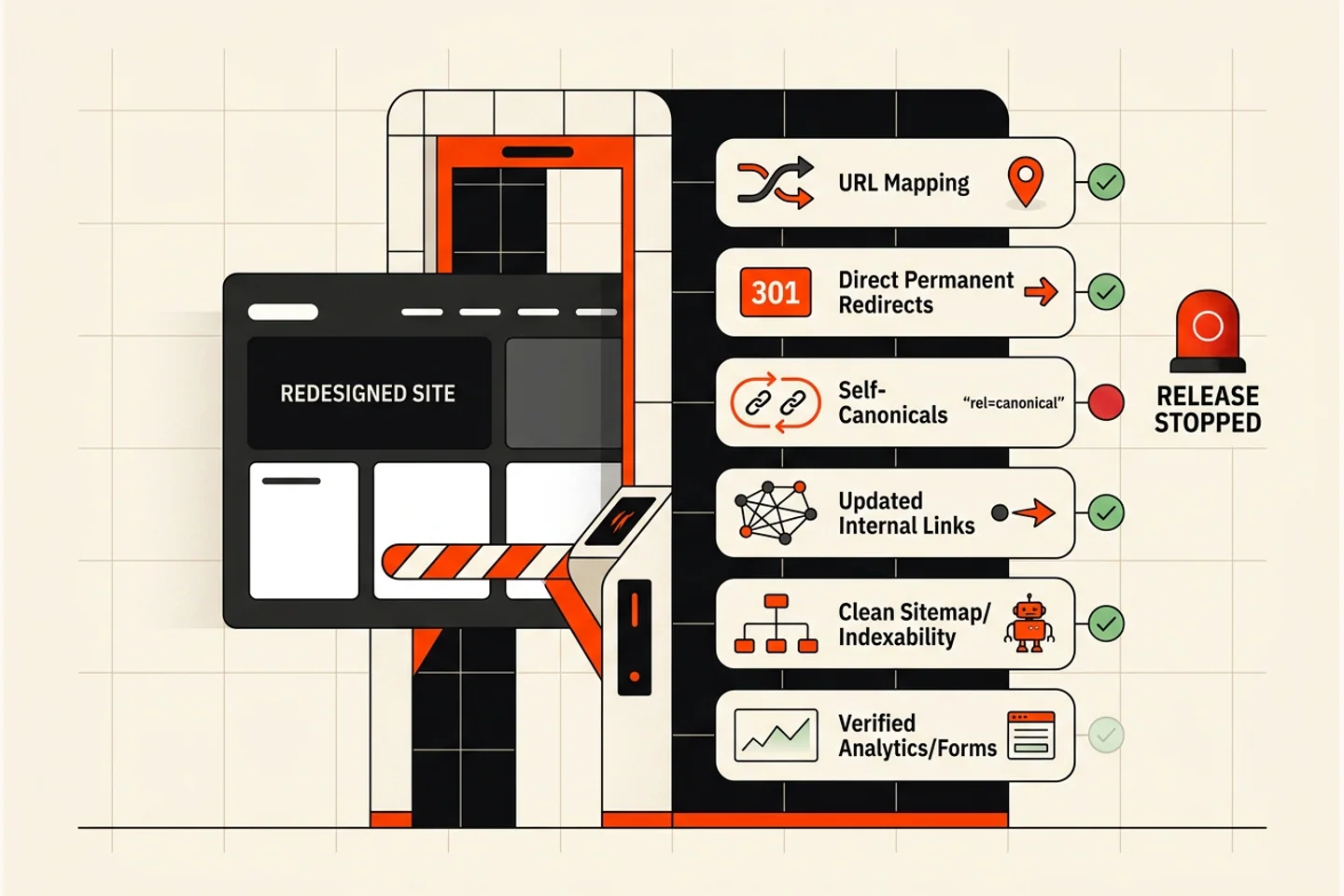
Do not launch because the homepage looks finished. Block release until the migration checks pass.
Crawl and index controls
- Production
robots.txtallows intended crawling. - Staging
noindexor authentication does not leak to production. - Indexable pages return
200; removed pages return genuine404/410. - Canonicals use the final production URLs.
- XML sitemap contains only canonical indexable URLs.
Redirects and links
- Every mapped old URL reaches the correct final destination in one hop.
- No important URLs redirect to irrelevant home/category pages.
- Internal links, navigation, canonicals and media use final URLs.
- HTTP/HTTPS, www/non-www and trailing-slash rules are consistent.
Content and experience
- Priority page meaning and useful evidence survived the redesign.
- Titles, descriptions and headings are unique and accurate.
- Mobile, keyboard and form journeys work.
- Performance is tested on representative templates.
Measurement and operations
- Analytics and consent operate as approved.
- Forms, calls, bookings, payments and CRM notifications are verified end to end.
- Search Console verification remains active.
- A rollback plan, owners and launch monitoring schedule exist.
Launch and tell search engines coherently
Activate redirects, publish the final sitemap and submit it in Search Console. Inspect a sample of priority URLs and monitor server logs/status reports.
Use Search Console’s Change of Address only for a genuine domain move. It is not required for a normal same-domain redesign. If changing domain, verify relevant old and new properties and follow Google’s current procedure.
Google advises keeping redirects for at least one year; retaining useful redirects longer can help people following bookmarks and old links. Update high-value external links where practical.
Monitor in several windows
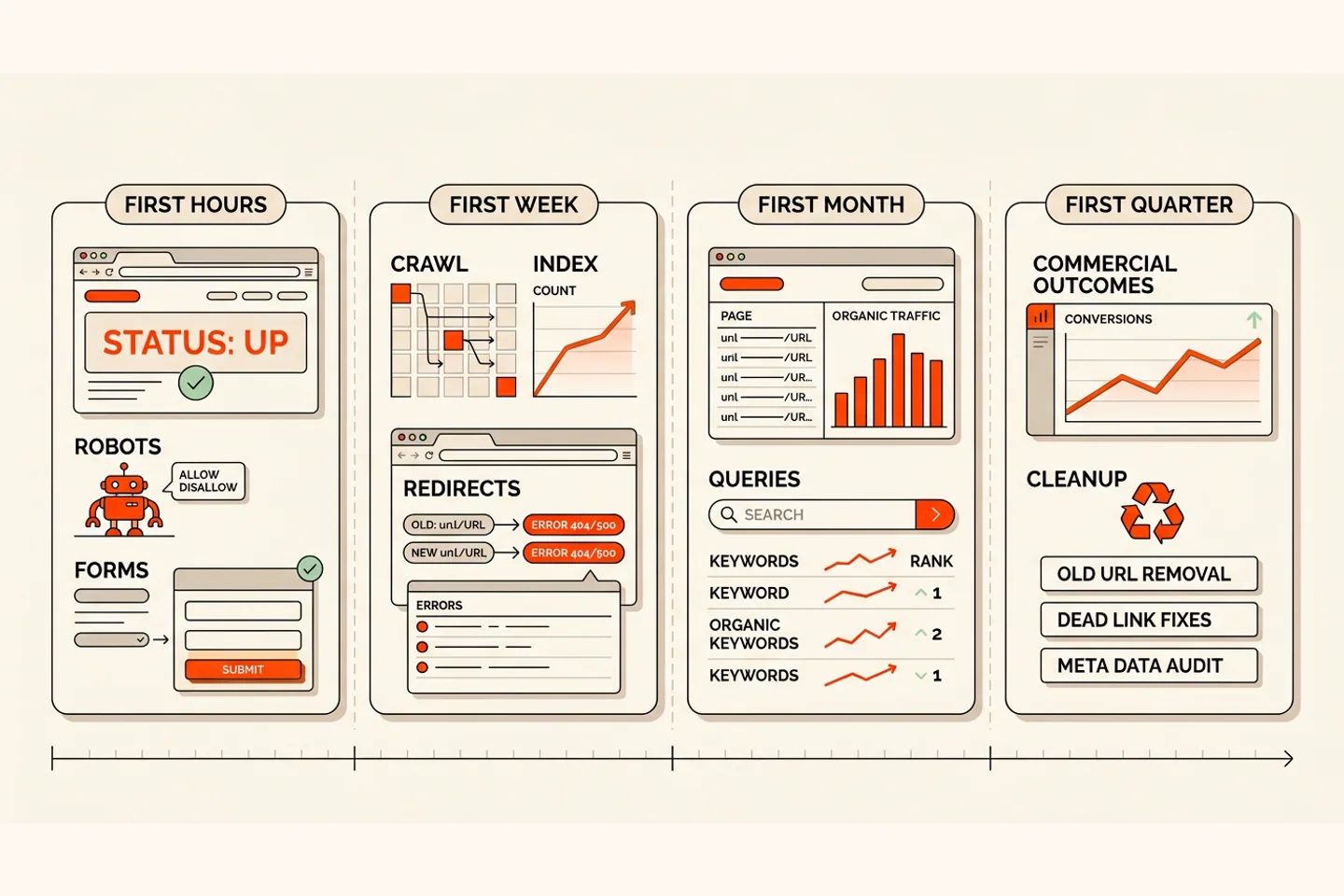
First hours
Test priority URLs, redirects, robots, canonicals, sitemap access, analytics, forms, calls, checkout and major device journeys. Watch 5xx, unexpected 404 and notification failures.
First week
Review Search Console inspection/coverage signals, crawler activity, old-to-new traffic flow, redirect errors and the highest-value landing pages daily. Fix systematic errors before polishing minor presentation.
First month
Compare query and landing-page trends with the baseline while accounting for seasonality and normal processing. Investigate losses by URL and intent; do not react to a single day’s ranking sample.
First quarter
Assess qualified leads, conversion rate, revenue contribution, Core Web Vitals and editorial efficiency. Confirm important redirects remain and close temporary launch workarounds.
Common causes of preventable loss
- Launching with production
noindexor blocking scripts/resources. - Removing useful content for shorter visual layouts.
- Changing every URL without need.
- Redirecting removed pages to the homepage.
- Creating redirect chains or loops.
- Canonicals pointing to staging, old or inconsistent URLs.
- Forgetting PDFs, images, hreflang or campaign landing pages.
- Breaking analytics, consent, forms or CRM delivery.
- Declaring success from traffic while qualified leads fall.
What to do next
If the redesign has not launched, freeze URL changes until the inventory and map exist. If it has launched, crawl old and new URL lists immediately, repair the highest-value mismatches and preserve evidence before making more changes.
The complete website redesign guide covers costs, governance and the wider process. If you are still deciding whether replacement is justified, read seven signs your website needs a redesign. Hatch’s web design service and SEO-safe redesign review can identify what must be protected before scope is signed.
Common questions
Frequently Asked Questions
Will a website redesign reduce Google rankings?
It can cause temporary fluctuations or lasting losses if valuable pages, content, links or technical signals are mishandled. A complete inventory, relevant URL mapping, direct permanent redirects, careful testing and monitoring reduce risk but cannot guarantee zero movement.
Should URLs change during a redesign?
Keep clear established URLs unless there is a defensible user or architecture reason to change them. Visual design or a new CMS alone does not require new paths.
Which redirect should a redesign use?
For a permanent URL change, Google recommends a server-side permanent redirect such as 301 or 308. Redirect each old URL directly to the closest relevant new destination and avoid chains or blanket homepage redirects.
How long should redesign redirects remain?
Google recommends keeping redirects for at least one year and notes that retaining them longer can help users. Update internal and important external links so visitors do not depend unnecessarily on redirects.
Do I use Search Console Change of Address after a redesign?
Use it for a move to a different domain when Google's requirements are met. An ordinary redesign or same-domain URL-path change does not require the Change of Address tool, though Search Console should still be used for sitemap, inspection and performance monitoring.
Want Us To Look At Your Version?
Show us what is not working and we’ll give you a straight answer.
Founder of Hatch. Writing practical, jargon-free advice for businesses that want to get found and turn attention into enquiries.